
I still remember the first time when someone had told me that they’d built and deployed a full backend API using just an AI assistant. No Stack Overflow; No late-night debugging rabbit holes; No coffee-fueled frustration. I thought they were just exaggerating the way usually humans do when they’ve just discovered something new and they can’t quite believe it themselves.Then I tried Claude Code, and I completely understood what they meant.
Claude Code is Anthropic’s dedicated coding tool, built on top of their Claude AI models. But calling it a chatbot feels like calling a Swiss Army knife a toothpick. You’re not just throwing questions at it and hoping for the best. It’s closer to having a senior developer sitting right next to you one who never gets annoyed when you ask the same thing twice, never loses the thread halfway through a complex problem, and can read your entire codebase in the time it takes you to refill your coffee. Whether you’ve written your first Hello World or you’ve been shipping production software for a decade, this tool genuinely changes how you work.
If you’re still comparing it with other options, it’s worth checking out a more detailed breakdown like Codex vs Claude Code
In this guide, I’m walking you through everything that Claude Code actually is, how to install it, what it costs, how the agent mode works, and how to use it properly so you’re getting real results rather than just chatting with an AI.
[IMAGE: Claude Code AI interface showing code completion and chat assistant – claude code ai beginner guide 2026]
What Is Claude Code AI and Why Developers Can’t Stop Talking About It
Let’s be honest, there are a lot of AI coding tools out there right now, and most of them blur together after a while. So what makes Claude Code AI different enough that it’s developed such a specific following among developers?
If you’re comparing tools side by side, you might also want to check Cursor vs Claude Code
Anthropic, the same team behind the Claude family of language models, builds Claude Code. What separates it from a general-purpose chatbot is that it was designed specifically for software development workflows. It doesn’t just answer questions about code; but it reads files directly from your project, It can understand how those files relate to each other, It can then also run terminal commands, write and edit code across multiple files simultaneously, and also help you debug by tracing errors back to their actual source.
The large context window makes you feel more in control and confident, knowing your entire project stays in ‘memory’ during a session.
It also handles a range of practical tasks that go beyond raw code generation, explaining legacy code written by someone who left the company three years ago, reviewing a pull request for subtle logic errors, and generating comprehensive unit tests for functions you already wrote. The breadth is genuinely useful.
The agent mode can plan, execute, and course-correct tasks autonomously, making you feel excited and trusting in its capabilities to lighten your workload.
How to Download and Install Claude Code AI
Getting set up is simpler than most people expect. There’s no complex environment to configure, no obscure dependencies. The Claude code AI download process takes about five minutes if you already have Node.js on your machine.
Step-by-Step: Claude Code AI Install on Any System
Here’s exactly how to get Claude Code running from scratch:
- Confirm you have Node.js version 18 or higher installed. Run node –version in your terminal to check.
- Open your terminal and run: npm install -g @anthropic-ai/claude-code
- Once installed, navigate to your project folder and run: claude
- You’ll be prompted to authenticate with your Anthropic account. If you don’t have one, creating it takes about two minutes at anthropic.com.
- After authentication, Claude Code opens an interactive session directly in your terminal and from there, you’re live.
The claude code ai install process works on Mac, Linux, and Windows via WSL (Windows Subsystem for Linux). Running it natively on Windows without WSL tends to create friction, so if you’re on Windows, taking fifteen minutes to set up WSL first is absolutely worth it.
If you’re on a specific platform, follow a detailed setup guide:

One recommendation based on my own experience: run your first session inside a real project folder rather than an empty directory. Claude Code is dramatically more useful when it has actual files to read and context to work with. Starting in an empty folder is like asking someone to review your work before you’ve written anything. The feedback you get back will be correspondingly thin.
What You Need Before You Start
Before your first session, make sure you have:
- An Anthropic account (free to create)
- Node.js 18 or higher installed
- A code project to work on any language works
- Basic comfort running commands in a terminal
That’s genuinely it. No IDE plugin required, no API key; you need to hunt down separately. The setup authentication is handled through the CLI flow automatically.
Claude Code AI Pricing: What You Actually Pay
This is the question I see everywhere, and the answer is more nuanced than a simple number.
Claude’s code AI pricing is usage-based. You pay for the tokens you consume rather than a flat monthly subscription, the way you might with some other tools. Anthropic bills through their API, and the cost depends on which Claude model is running under the hood during your session.
f you’re evaluating cost vs performance across tools, you should also see Gemini CLI vs Claude Code
Here’s a rough breakdown of the pricing tiers as of early 2026:
| Model | Input Cost (per 1M tokens) | Output Cost (per 1M tokens) | Best For |
|---|---|---|---|
| Claude Haiku 3.5 | ~$0.80 | ~$4.00 | Quick tasks, high-volume use |
| Claude Sonnet 3.7 | ~$3.00 | ~$15.00 | Balanced performance and cost |
| Claude Opus 3.5 | ~$15.00 | ~$75.00 | Complex reasoning, deep tasks |
For a developer using Claude Code for a few focused hours each day on real projects, most people report spending somewhere between 20–20–60 per month, depending on intensity. That’s nothing, but it’s also less than most SaaS developer tools with comparable functionality.
Is Claude Code AI Free?
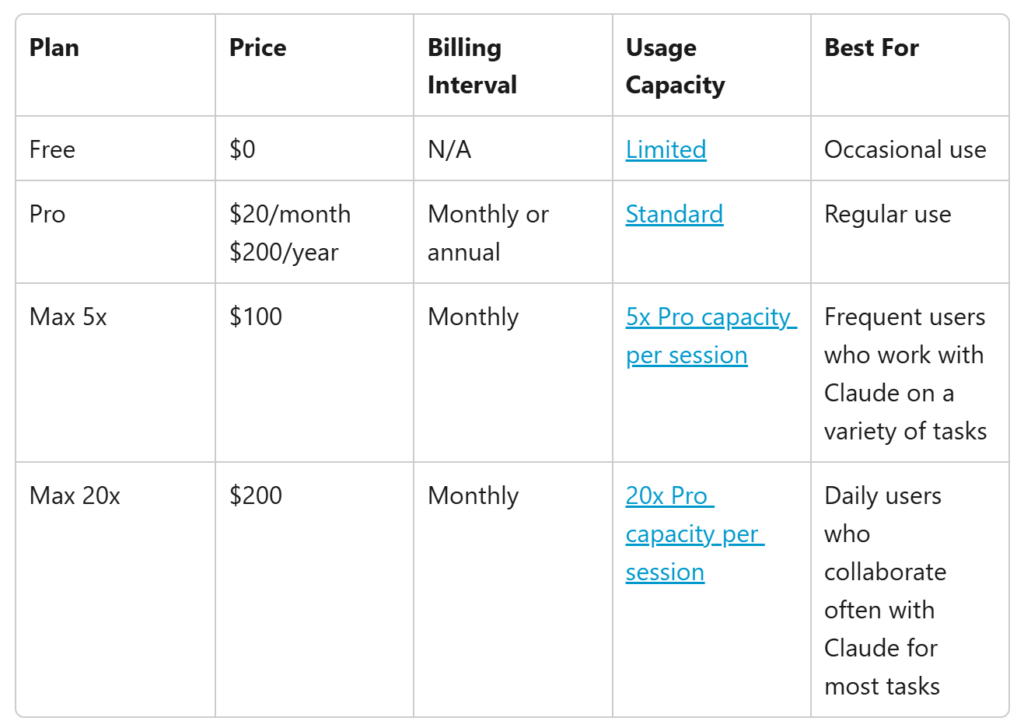
Here’s where it gets interesting. Claude’s code AI free access does exist in a limited form. Anthropic offers a free tier through Claude.ai that lets you interact with Claude models for general tasks, including coding questions. Still, the full Claude Code CLI experience, the terminal-based tool with project file access and agent mode, requires an API key and incurs usage costs.
There’s also a Claude. An AI Pro subscription that gives you access to more powerful models with higher usage limits, but that’s distinct from the API billing that powers Claude Code’s terminal tool. If you’re a student or hobbyist working on smaller projects, the free tier at Claude.ai can stretch further than you’d expect for the basic questions. For anyone doing serious daily development work, API-based billing is almost certainly what you’ll end up on, and it’s worth monitoring your usage in the early weeks so you can calibrate.
Using Claude Code AI as Your Everyday Coding Assistant
This is where theory meets practice. Let me walk you through what a real working session looks like because the way most people think they should use this tool and the way it actually works well are pretty different things.
Getting Real Results with the Claude Code AI Assistant
When I first started using the claude code ai assistant functionality, I made a classic beginner mistake: I treated it like a search engine. Short, vague prompts, mildly disappointed results. The tool rewards specificity and context in a way that becomes obvious quickly once you kWhen I first started using the Claude code AI assistant functionality, I made a classic beginner mistake: I treated it like a search engine. Short, vague prompts, mildly disappointed results. The tool rewards specificity and context in a way that becomes obvious quickly once you know to look for it.
Here’s what the difference looks like in practice. A weak prompt: “Fix my authentication bug.” Claude Code has no idea what authentication system you’re using, where the bug is, what the error message says, or how your code is structured. The response will be generic because the question was generic.
A strong prompt: “I’m getting a 401 error when a user tries to refresh their JWT token. The error happens in /src/auth/middleware.js around line 47. Can you read that file and check whether the token validation logic handles expired tokens correctly?”
In that second case, Claude Code reads the file, traces the issue to its source, and typically gives you a working fix in one exchange. That’s a completely different experience, and the only thing that changed was how you asked.
The Claude Code AI assistant mode handles a wide range of real development tasks:
- Writing unit tests for existing functions you haven’t tested yet
- Refactoring messy code without changing its external behaviour
- Explaining what a complex piece of code actually does in plain language
- Reviewing code for edge cases and potential bugs before you ship
- Generating boilerplate so you can focus on the logic that actually matters
One thing many beginners don’t know about upfront is Claude’s code AI assistant sycophancy. This is a genuine phenomenon where AI models, such as Claude, can sometimes agree with incorrect assumptions in your prompts rather than pushing back with the accurate answer. Anthropic has worked on reducing this in Claude’s training, but it hasn’t been eliminated entirely. If you ask, “This code looks correct, right?” there’s a real chance it agrees even if there’s a subtle bug hiding in there.
The fix is straightforward: ask it to critique rather than confirm actively. “What’s wrong with this code?” gets you a more honest answer than “Does this look right?” That small shift in framing makes a meaningful difference in the quality of what you get back.
Claude Code AI Agent Mode: Letting It Work Without You Managing Every Step
This is the feature that tends to get the most attention from developers who’ve been using AI coding tools for a while because it represents a genuine shift in how work gets done, not just a faster way to do the same thing.
Standard AI coding assistants are reactive by design. You ask, they answer. The Claude code AI agent mode flips that dynamic. Instead of responding to individual prompts, you give Claude Code a goal, describe the outcome you want, and it figures out the steps required, executes them in order, evaluates the results, and continues until the task is complete or until it hits something that genuinely needs your input.
If you want to actually use this effectively in real projects, the Complete Claude Code Dispatch Guide breaks down how to structure tasks and manage execution properly.
A practical example that happened to me recently: I needed to add a CSV export function to a data table in a web app. In standard mode, I’d need to prompt Claude step by step to write the export function, then hook it to the button click event, then handle the error cases, then add the loading state. In agent mode, I described the feature once, and Claude Code planned the whole thing, wrote the relevant files, and flagged the one decision point where it needed my input before proceeding. The whole task that would have taken fifteen to twenty back-and-forth exchanges took three.
It handles everything from setting up new project scaffolding to refactoring entire modules and migrating dependency versions across large codebases. Genuinely impressive stuff. That said, I’d strongly recommend reviewing everything it produces before you ship it, not because it gets things wrong all that often, but because you should always understand your own code. Don’t let any tool; no matter how good, become a black box in your own project.
One practical tip I’ve picked up: agent mode works noticeably better when you give it explicit constraints. There’s a real difference between an open-ended instruction and something like, “Refactor this module, but don’t touch any public function signatures that other files depend on.” The second version gives it clear guardrails, and the output reflects that cleaner, more targeted, and a lot easier to review. The more specific you are about what you don’t want changed, the more useful the results tend to be.
Claude Code AI vs. Other AI Coding Tools: What Actually Differs
I want to avoid just declaring a winner here, because the honest answer is that the best tool depends on what you’re actually doing and how you work.
That said, I’ve used most of the major alternatives: GitHub Copilot, Cursor, ChatGPT with code interpreter, Gemini Code Assist and the Claude Code AI tool has a specific set of strengths that make it stand out for particular kinds of work.
For deeper comparisons, explore:
Context handling is the most significant one. Claude’s models hold more context without degrading than most alternatives, which matters enormously on larger projects. When you’re working in a codebase with dozens of interconnected files, you need the AI to actually understand how they relate, not just generate plausible-looking code in isolation without knowing what it’s supposed to connect to.
The instruction following is another consistent strength. If you tell Claude Code not to use a certain library it won’t. If you specify a formatting convention, it sticks to it. This sounds minor; but when you’re integrating AI output into a codebase with real standards and conventions the gap between a tool that follows instructions and one that keeps going rogue is significant in practice.
Where Claude Code is less strong is in IDE integration. Tools like Cursor are built directly into a visual editor, which makes the interaction feel more natural for developers who prefer working in a GUI. Claude Code is terminal-first, and while that’s comfortable for many developers, it’s a real barrier if you’re not at home on the command line.
The API billing model also means costs can creep up if you’re not paying attention, particularly in agent mode on complex tasks, which can consume meaningful tokens before you realise it. Building the habit of checking your usage early saves headaches later.
Tips for Getting the Most Out of Claude Code AI From Day One
II’m keeping this practical. These are the things I genuinely wish I’d known when I started.
Start with a project you already know. The first time you use Claude Code, working in familiar code means you can tell when it does something smart versus when it’s just sounding confident. In an unfamiliar codebase, you can’t evaluate the quality of what it produces, which defeats the point of learning the tool.
Use the /compact command during long sessions. When a session runs long, this command tells Claude Code to summarise its current understanding of the conversation and compress it, which keeps performance sharp without losing important context. I found this one by accident after a particularly long debugging session, and it made a real difference.
Ask for explanations, not just fixes. “Fix this bug and explain what was causing it” teaches you something. “Fix this bug” just moves you forward. Over time, that habit turns Claude Code from a shortcut into something that actively improves how you think about code.
Tell it what you don’t want. If you’ve already tried an approach and it didn’t work say so explicitly. If there’s a library your project can’t use then just mention it upfront. Constraints are useful inputs, not limitations; they make the output more precise.
Monitor your token usage weekly at first, especially once you start using agent mode. The costs are reasonable, but they’re easier to manage if you build the habit of checking them before they accumulate to a number that surprises you.
Wrapping Up: Is Claude Code AI Worth Learning in 2026?
If you’re a developer who hasn’t tried Claude Code AI yet, I think 2026 is the year it starts feeling less like an optional add-on and more like a standard part of how serious code gets written.
It isn’t perfect and I want to be honest about that. It makes mistakes. It can sound confident even when it’s slightly off, and the sycophancy issue I mentioned earlier is real and worth keeping in mind as you work with it. It won’t always push back when it should, and that means the responsibility of staying critical falls on you.
But when you learn to use it properly giving it real context, clear constraints, and specific instructions; it dramatically shrinks the gap between having an idea of it to holding working code in your hands.
My honest advice for anyone just starting out: skip the toy examples. Drop it straight into a real project, something you actually care about getting right. The learning curve is genuinely short, the feedback loop is immediate, and within a few sessions, you’ll have a clear sense of where it saves you meaningful time and where your own judgment still needs to lead. That’s a line worth finding and the only way to find it is to start.
That last part, knowing when to trust it and when to double-check it yourself, is the real skill worth developing.
Frequently Asked Questions
Can Claude AI do coding?
Yes, and it does it quite well across a wide range of tasks. The Claude code AI tool can write functions from scratch, debug existing code, refactor messy logic, generate unit tests, explain what unfamiliar code does, and review files for potential issues. The terminal-based Claude Code CLI specifically is built for development workflows, meaning it can read your actual project files and edit across multiple files in a single session. It works with virtually every mainstream programming language: Python, JavaScript, TypeScript, Go, Rust, Ruby, and more. The biggest variable in how useful it is comes down to how specifically you frame your prompts and how much relevant context you give it. Vague questions get vague answers; specific, well-framed questions get genuinely useful ones.
Is Claude AI coding free?
Partially. The free tier at Claude. AI lets you ask Claude coding questions and get useful answers, but the full Claude Code AI terminal experience, which reads your project files and runs in agent mode, requires API access, which is billed based on usage. The cost is reasonable for occasional or moderate use, and typically lands in the 20–20–60 per month range for daily professional development work, depending on which model you’re using. Suppose you’re new to it and want to explore before committing, starting with the free Claude. An AI chat interface is a sensible way to get familiar with how the model reasons about code before you move to API billing.
Is AI pushing 75% of code?
Some large tech companies have publicly cited figures suggesting AI now contributes to a significant portion of their total code output. Google and Microsoft have both thrown out numbers in the 25–40% range. The “75%” figure you might have seen circulating is real, but it’s doing a lot of heavy lifting the actual impact varies widely depending on the company, the team size, and the nature of the work being done. Broad averages can only tell you so much.
What is clear, though, is that tools like Claude Code are actively shifting the ratio of human-written to AI-generated code in ways the industry can actually measure. That’s not hype it’s showing up in the numbers, even if those numbers don’t tell a single, clean story just yet. Whether that’s purely a productivity gain or raises valid concerns about code quality and understanding depends entirely on how thoughtfully teams are using these tools. There’s a real difference between AI generating routine boilerplate and AI writing core business logic that nobody reviews carefully.
Is Claude better than GPT in coding?
In my experience, Claude consistently holds its own on tasks that require following complex, multi-part instructions and maintaining context across long conversations both of which matter enormously in real development work, where nothing exists in isolation. Where GPT-4o and its variants tend to pull ahead is in third-party integrations and the broader ecosystem of tools built around them. That’s a legitimate advantage depending on your setup.
Head-to-head benchmark results are honestly not that useful here. They vary by task type, shift every time either company pushes a model update, and rarely reflect the kind of work you’re actually doing day to day.
What I can say from practical experience is that Claude genuinely shines when the work requires nuanced refactoring and architectural reasoning the kind of thinking that can’t just be pattern-matched. You feel it most when you’re untangling something that was never designed to be untangled, or trying to make a structural decision that has to hold up weeks down the line. GPT sometimes has an edge in raw speed for simpler, well-defined code generation tasks the kind where you already know exactly what you want and just need it written fast.
The most useful thing you can do is stop relying on theoretical comparisons and try both on a project you actually know. Your own workflow, your own codebase, your own instincts those will tell you far more than any benchmark ever will.